
Connecting the DC Cables
 Qualified person
NOTICE
Damage to the product due to ground fault on DC side during operation
Due to the transformerless topology of the product, the occurrence of ground faults on DC side during operation can lead to irreparable damage. Damages to the product due to a faulty or damaged DC installation are not covered by warranty. The product is equipped with a protective device that checks whether a ground fault is present during the starting sequence. The product is not protected during operation.
- Ensure that the DC installation is carried out correctly and no ground fault occurs during operation.
Requirements:
An external DC load-break switch must be installed (e.g. an integrated DC load-break switch in the battery cabinet).
The batteries must be protected at all poles.
The DC cables must be inserted into the product.
Additionally required material (not included in the scope of delivery):
Clean cloth
Ethanol cleaning agent
Press tool
Procedure:
- Ensure that no voltage is present on the DC cables.
- Dismantle the DC cables.
- Pull the supplied blue heat-shrink tubing onto the DC- cable and crimp the ring terminal lug ( > Crimping of Ring Terminal Lug). The heat-shrink tubing must be below the stripped conductor section.
- Pull the supplied red heat-shrink tubing onto the DC+ cable and crimp the ring terminal lug ( > Crimping of Ring Terminal Lug). The heat-shrink tubing must be below the stripped conductor section.
- Remove any cable remnants from the product.
- Remove the fixing of the pre-harnessed DC cables from the product.
- Clean the contact surfaces of all terminal lugs using a clean cloth and ethanol cleaning agent and do not touch the contact surfaces after cleaning.
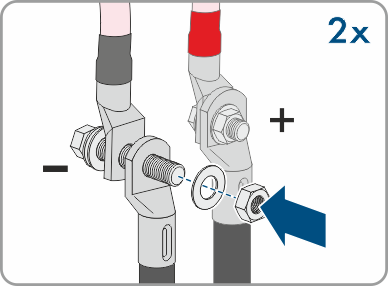
- Connect the DC cables with each other. To do this, insert the screw and washer assembly (M10x40) from the back through the round holes of the terminal lugs and from the front tighten with the washer (M10) and the hex nut (AF16, tightening torque: 24 Nm ± 2 Nm). Ensure correct polarity.
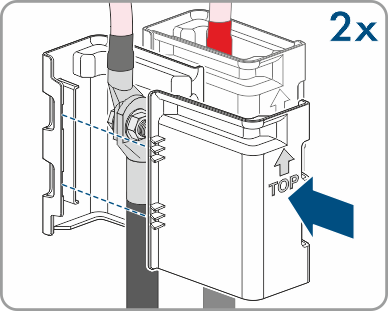
- Place the touch protection elements around the terminal lugs and plug together until they audibly click into place.
- Firmly tighten the swivel nuts of the cable glands.
Also see: