
Configuring the primary battery cabinet with multiple battery cabinets
 Qualified person

First set all battery cabinets individually
Connecting the AC cables, DC cables, and CAN communication can lead to unforeseen disturbances if the battery cabinets have not yet been configured correctly.
- Only the grounding connection should be connected before configuring the secondary battery cabinets.
- Switch on, set, and then immediately switch off each battery cabinet individually as described here.
- Only then should you proceed with the electrical connection.
Requirements:
- All battery cabinets are switched off.
- No electrical connections have yet been made on the battery cabinets.
Procedure:
- Connect the grounding of the primary battery cabinet.
- Switch on the primary battery cabinet ( > Switching the battery cabinet on).
- Outdoor version: Connect the battery cabinets.
- Log into the primary battery cabinet control panel as Operator. Log in is performed by clicking on the username at top left. You will obtain the password from SMA.
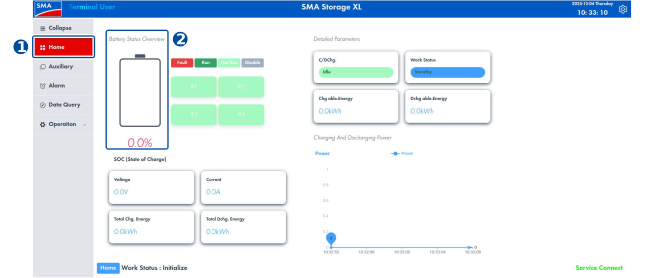
- Select Home to the left in the menu ribbon.
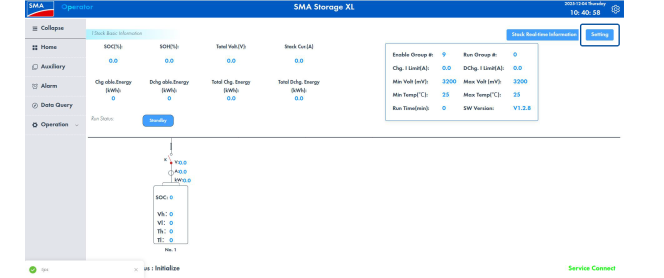
- Click on the image under Battery Status Overview.
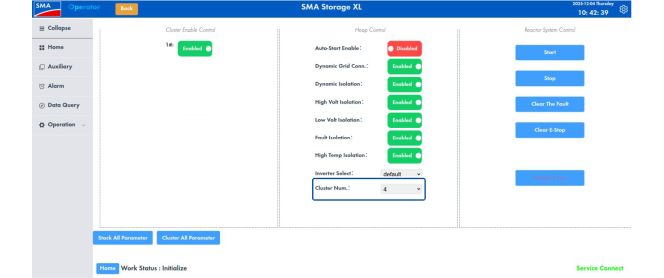
- Select the button Setting.
- Select the number of battery cabinets in the parameter Cluster Num..
- Switch off the primary battery cabinet.
Also see: