
Configuring the primary battery cabinet with multiple battery cabinets
 Qualified person

First set all battery cabinets individually
Connecting the AC cables, DC cables, and CAN communication can lead to unforeseen disturbances if the battery cabinets have not yet been configured correctly.
- Only the grounding connection should be connected before configuring the primary battery cabinet.
- Switch on, set, and then immediately switch off each battery cabinet individually as described here.
- Only then should you proceed with the electrical connection.
Requirements:
- All battery cabinets are switched off.
- No electrical connections have yet been made on the battery cabinets.
Procedure:
- Connect the grounding of the primary battery cabinet.
- Switch on the primary battery cabinet ( > Switching the battery cabinet on).
- Outdoor version: Connect the battery cabinets.
- Select Terminal User on the primary battery cabinet control panel at top left. The Log in window will open. Use the arrow to select Operator and click on Log in. You will receive the password following participation in the certification training. After entering the password, confirm it and then click on Log in. Then, confirm again in the new window via Confirm.
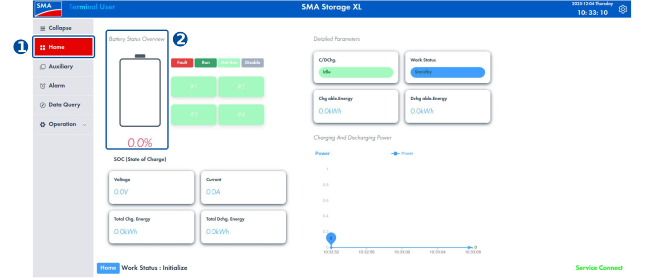
- Select Home to the left in the menu ribbon.
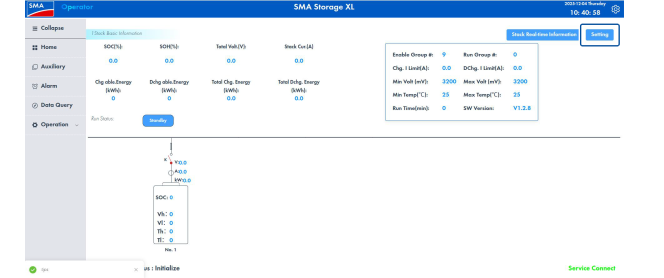
- Click on the image under Battery Status Overview.
- Select the Setting button.
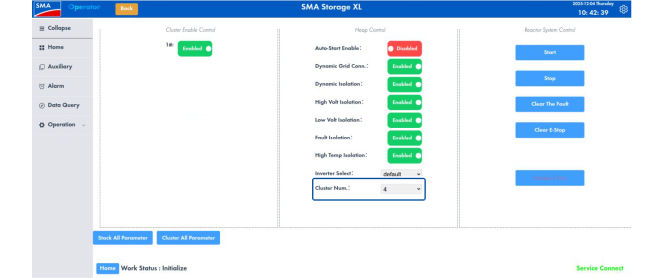
- Select the total number of battery cabinets (primary and secondary) in the parameter Cluster Num..
- All configured clusters will be displayed under Cluster Enable Control upon completion of commissioning. All clusters must be set to Enable in order that control is managed via the primary battery cabinet.
- For grid-tied operation: Disable the function Auto-Start Enable in the menu Parameter.
- The button alongside the function name is red (Disabled).
- For grid-free operation: Enable the function Auto-Start Enable in the menu Parameter.
- The button alongside the function name is green (Enabled).
- Switch off the primary battery cabinet.
Also see: