Connecting the Data Cable of the Battery
Additionally required material (not included in the scope of delivery):
- Where required: Field-assembly RJ45 connector.
- Standard network cable
Procedure:
- When using self-assembly network cables, assemble the RJ45 connectors and connect them to the network cable (see connector manual).
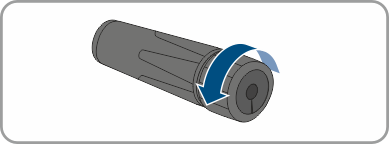
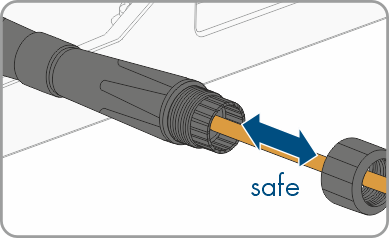
- Remove the union nut from the adapter.
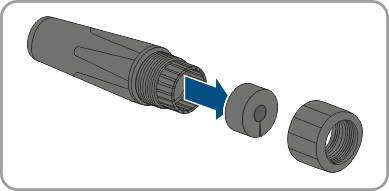
- Detach the cable support sleeve. The cable support sleeve can be pressed out from the other side.
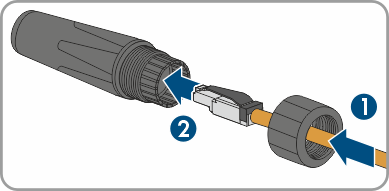
- Thread the cable through the union nut and through the adapter.
- Plug the network cable into the RJ45 cable connector. When doing so, route the cable through the union nut and through the adapter.
- Ensure that the network cable is securely in place.
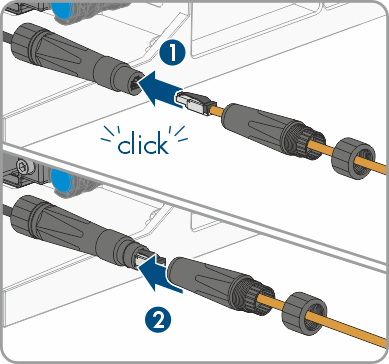
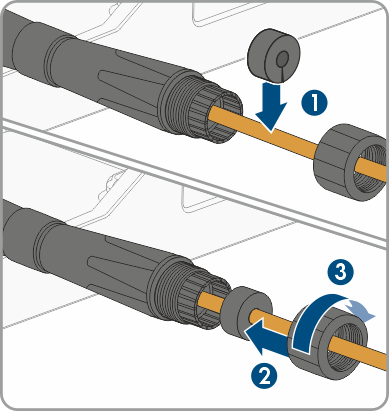
- Attach the cable support sleeve between the swivel nut and adapter and secure the cable. To do this, firmly tighten the adapter and the swivel nut.
- Connect the other end of the network cable to the inverter (see inverter manual).