Connecting the cable for the automatic transfer switching device (SMA Backup)
 Qualified person
Backup electrical loads that can be supplied in the event of a power outage can be connected to the automatic transfer switching device. Follow the manual for the SMA Backup product variants.
Procedure:
- Disconnect the AC and backup miniature circuit breaker from all 3 line conductors and secure against reconnection.
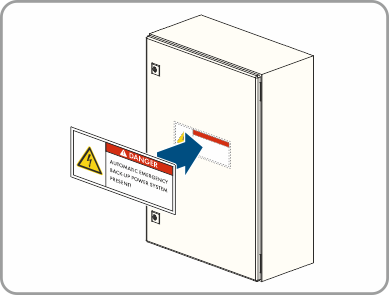
- Place a notice on the subdistribution indicating the battery-backup operation of the inverter.
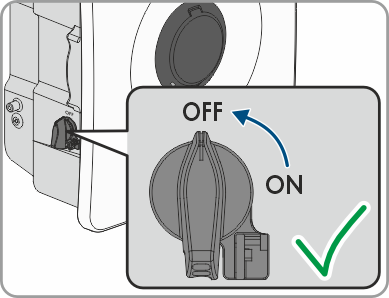
- Ensure that the DC load-break switch has been switched off and secured against reconnection.
- Ensure that the battery is switched off.
- Unscrew the union nut of the cable gland for SPS.
- Pull the upper part of the terminal off the connector enclosure.
- Remove the sealing ring from the connector enclosure.
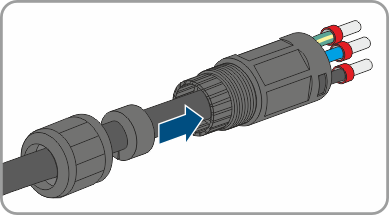
- Route the cable through the union nut, sealing ring, and connector enclosure.
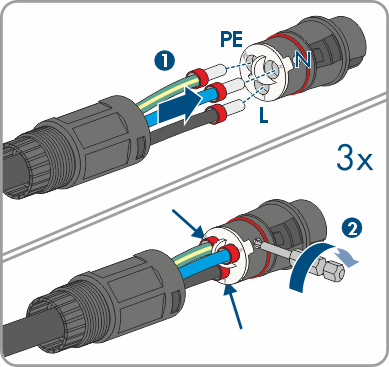
- Insert the conductors L, N, and PE according to the labeling into the connector and tighten the connector screws (tightening torque: 1 Nm).
- Ensure that the conductors are correctly assigned and firmly seated in the connector.
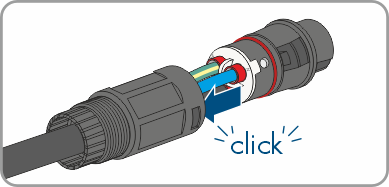
- Insert the connector enclosure into the cable gland. The terminal must snap audibly into place.
- Tighten the swivel nut on the connector enclosure.
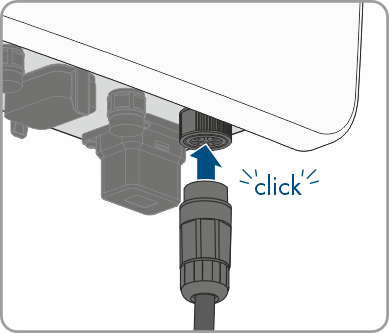
- Connect the connector to the inverter enclosure.