
Connecting the Network Cables
 Qualified person
 DANGER
Danger to life due to electric shock in case of overvoltages and if surge protection is missing
Overvoltages (e.g., in the event of a flash of lightning) can be further conducted into the building and to other connected devices in the same network via the network cables or other data cables if there is no surge protection. Touching live parts and cables results in death or lethal injuries due to electric shock.
- Ensure that all devices in the same network and the battery are integrated into the existing surge protection.
- When laying the network cables or other data cables outdoors, it must be ensured that a suitable surge protection device is provided at the transition point of the cable from the product or the battery outdoors to the inside of a building.
NOTICE
Product damage due to moisture penetration
Moisture penetration can damage the product and impair its functionality of the product.
- Connect the network cable with the supplied RJ45 protective sleeve to the product.
Additionally required material (not included in the scope of delivery):
Network cable
Where required: Field-assembly RJ45 connector.
Procedure:
- Disconnect the inverter from voltage sources and secure it against being switched on again ( > Disconnecting the Inverter from Voltage Sources).
- When using a self-assembly network cable, assemble the RJ45 connectors and connect them to the network cable (see connector documentation).
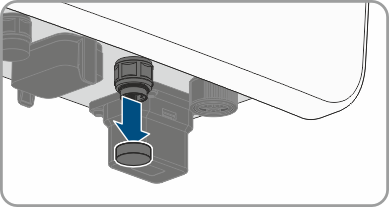
- Unscrew the protective cap on the enclosure of the inverter.
- Retrieve the cable gland for the connection from the scope of delivery.
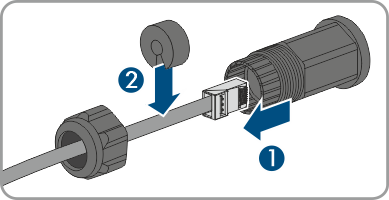
- Loosen the union nut and remove the sealing plug from the threaded sleeve.
- Feed the network cable through the union nut, the sealing plug, and the threaded sleeve.
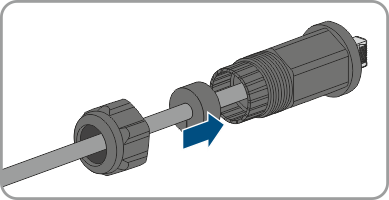
- Press the sealing plug into the threaded sleeve.
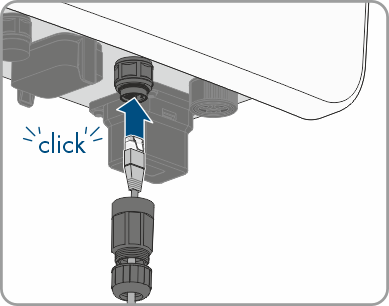
- Insert the network plug of cable into the product's network port. Ensure that the cable is correctly locked in place.
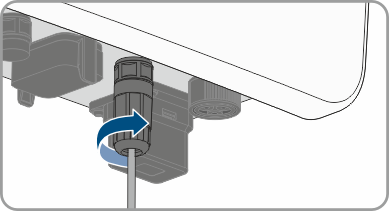
- Turn the threaded sleeve onto the thread of the network port on the product and turn the union nut onto the threaded sleeve.
- Tug lightly to ensure that the network cable is secure.
- If the inverter is installed outdoors, install overvoltage protection for all components in the network.
- To integrate the inverter into a local network, connect the other end of the network cable to the local network (e.g., via a router).
Also see: