
Connecting the power cable of the battery
 Qualified person
NOTICE
Damage to the DC connectors due to the use of contact cleaner of other cleaning agents
Some contact cleaners or other cleaning agents may contain substances that decompose the plastic of the DC connectors.
- Do not use contact cleaners or other cleaning agents for cleaning the DC connectors.

Observe manufacturer's specifications for battery power cables
When crimping battery power cables, the appropriate tool, correct cable cross-section, proper insulation stripping length, and a firm but non-damaging crimp are essential for a safe and conductive connection. Make sure not to damage the stranded wires and to insert and tighten all components correctly, especially the strain relief, to ensure a durable, moisture-proof, and abrasion-resistant connection.
If there are several inverters and only one battery in the system, the battery should be connected to the inverter that is to be configured as the System Manager.
Requirements:
The battery power cables must be pre-assembled ( > Assembling the DC Connectors (MC4)).
Procedure:
- Remove the sealing plugs from the terminals BAT + and BAT -.
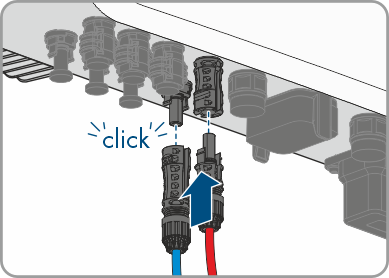
- Connect the DC connectors to the inverter.
- The DC connectors snap into place.
- Ensure that all DC connectors are securely in place.
Also see: