
My Locations
You can find your configured location in the menu under My Locations. The first location is created by SMA Service as part of the onboarding process or during the activation of the charging station through the self-service process. The creation of an additional location is only possible when setting up a new charging station.
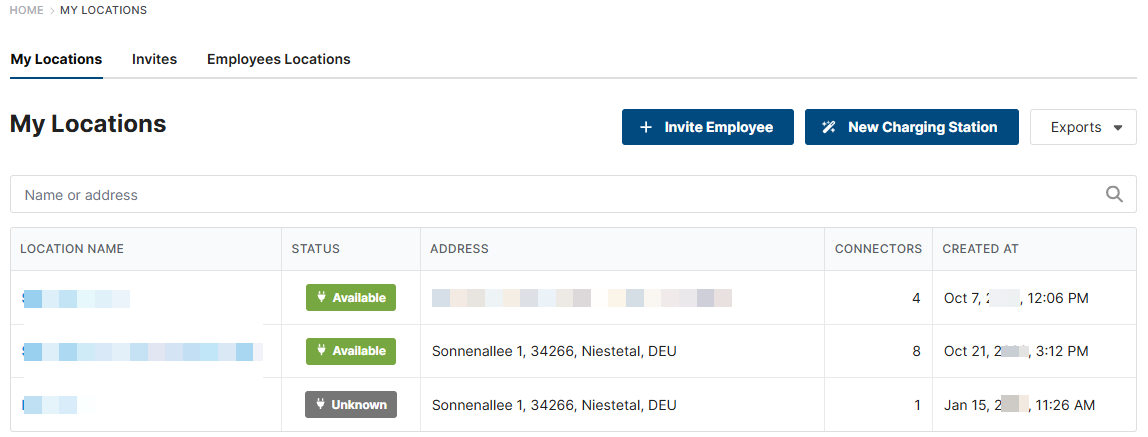
The following statuses are displayed under Status:
Available: Charging stations are connected
Unknown: No charging station connected/setup not yet completed
Load: When charging is taking place at all charging stations at the location
When you select a location, the context menu opens.
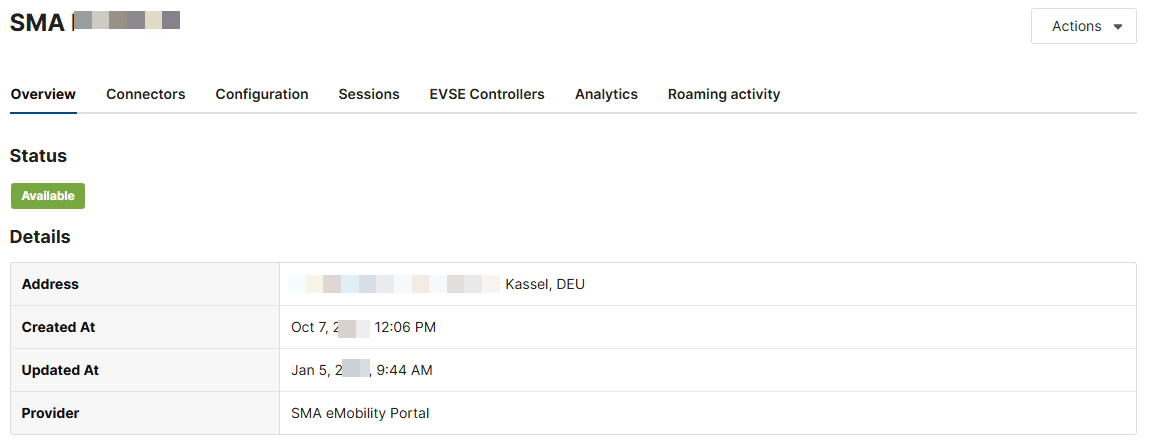
Overview
Here you will find all information about your location:
Address
Creation date:
Updated on
Supplier
Synchronization with the roaming hub
Connector
The status of the connections (charging points) is displayed. Each charging station has 2 charge points.
Available: Charging stations are connected
Not available: No charging station connected/setup not yet completed
Preparing: The vehicle is connected, but the charging process is not yet enabled
Unknown: The configuration of the charging station is not yet complete
Charging: The vehicle is charging
Finishing: Charging process has been completed and vehicle can be disconnected
Suspended EV: The charging process was stopped by the vehicle itself
Suspended EVSE / temporarily deactivated charging station: Charging process was stopped by the charging station
Failed: An error has occurred at the charging station or the at the charging connection; the charging process cannot be performed at the moment
Configuration
Further settings for the EV Charger Business can be made here. Among other things, one or more access groups can also be authorized for the charging station and charging via roaming and/or Scan2Pay can be enabled or disabled.
Sessions

Charging processes of the supplied RFID cards are not displayed automatically.
The supplied charging cards must be assigned to an access group.
Here you will find all charging processes carried out at your location, which can be viewed via RFID cards of a defined access group or are authorized via roaming.
The start and end times, the status of the charging process and the amount of energy charged are shown. The details (magnifying glass symbol) show which charging card was used to activate the charging process.
A CSV file can be created under [Export] for further evaluation.
EVSE Controller
Here you can see all the data for the respective charging station.
Serial Number
OCPP Identity
EVSE Identity
Location
connect state
Planned
Analytics
Charging processes of the supplied RFID cards are not displayed automatically.
The supplied charging cards must be assigned to an access group.
Diagrams of the charging processes, charged energy and the duration of the charging processes of all charging stations assigned to the organization are displayed here.
Roaming activity
Here an overview is provided of all roaming activity of the past 30 days.