
Design of the User Interface
The user interface of the SMA product (e.g. SMA Data Manager) and the user interface of Sunny Portal are uniform.
The number of functions and menus depends on whether you are on the local user interface of the product or in Sunny Portal.
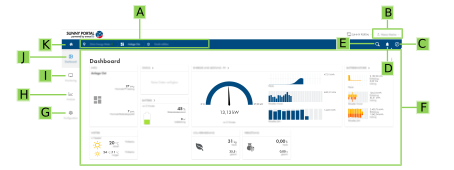
Design of the user interface (example)
Position | Designation | Description |
|---|---|---|
A | Focus navigation | Enables the navigation between the following levels:
|
B | User settings | Provides the following functions:
|
C | System information | Displays the following information:
|
D | Notifications | Display of higher-level notifications for events in the system |
E | System search | Search for systems |
F | Content area | Displays the dashboard or content of the selected menu |
G | Configuration | Offers different configuration options, depending on the scope of the connected devices and the selected level. |
H | Analysis | Offers detailed information on measured values of the system and of connected devices. The following functions are available for this purpose:
|
I | Monitoring | Displays depending on the selected device the following information on the current level and the superior levels:
|
J | Dashboard | Displays information and instantaneous values of the device or system currently selected. |
K | Home | Opens the user interface home page |