Components and Mode of Operation of Load Control
Components of Load Control
In the SMA Energy System Home, radio-controlled sockets can be used to control home appliances and they enable optimization of energy consumption and the self-consumption quota through load shifting. The radio-controlled sockets also measure the power consumption of the connected loads and thus enable energy monitoring.
As an adapter for a load, a radio-controlled socket can switch on the power supply or interrupt it. It also measures the power that the load requires for operation.
Compatible radio-controlled sockets for the SMA Smart Home can be found in the Technical Information "SMA SMART HOME - Compatibility List for Loads" at www.SMA-Solar.com.
Mode of operation of load control
Using various displays and settings in the system pages of Sunny Portal, you can display current information, e.g. status information, energy balances, and forecasts for PV generation and for specific electrical consumption in the household. From these, the Sunny Home Manager derives action recommendations and uses these recommendations to control the loads.
|
Function |
Explanation |
|---|---|
|
Creation of a PV yield forecast |
The Sunny Home Manager continuously logs the energy generated by the PV system. The Sunny Home Manager also receives location-based weather forecasts via the Internet. Based on this information, the Sunny Home Manager creates a PV yield forecast for the PV system. To query forecast information, you must fill in the following input fields on the System properties page in Sunny Portal:
If one of the three entries is missing, either the weather symbols are not displayed, the power forecast is not present, or it is incorrect.
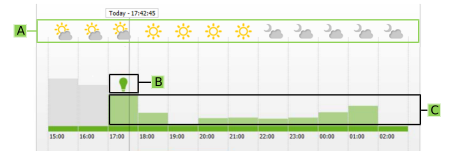
If the forecast information is set correctly in Sunny Portal, the hourly weather symbols (A) are displayed on the page Current Status and Forecast. The power forecast for each hour of the forecast time period is shown as a green bar (C). If the mouse pointer is moved over these bars, numerical values are displayed. The green light bulbs (B) above the bars refer to time periods in which, according to the power forecast, there will be a high proportion of surplus PV energy which could be consumed effectively by manual switching on of a load. In this way, by manual switching of loads (e.g. vacuum cleaning if there is a lot of sunshine in the afternoon), it is possible to actively increase the self-consumption of PV energy. |
Creation of a load profile | The Sunny Home Manager logs data on PV generation, grid feed-in and purchased electricity. Based on PV generation, grid feed-in and purchased electricity, the Sunny Home Manager determines how much energy is typically consumed at certain times and uses this to create a load profile for the household. This load profile can be different for each day of the week. The Sunny Home Manger receives the measured data for PV generation, grid feed-in and grid-supplied power via the installed or integrated energy meters (SMA Energy Meter). The measured data can also be transmitted directly from the inverters via the data connection. |
|
Configuration and system monitoring via Sunny Portal |
Sunny Portal serves as the user interface of the Sunny Home Manager. The Sunny Home Manager establishes the Internet connection to Sunny Portal via a router and sends the read-out data to Sunny Portal. The user can make all the required settings for the Sunny Home Manager system via Sunny Portal. You can call up data on energy consumption and generation and also forecasts and information on energy use via diagrams and tables. In addition, basic PV system monitoring is also possible via Sunny Portal. |
Load control via radio-controlled sockets | Specific loads connected to radio-controlled sockets can be switched on and off by the Sunny Home Manager. The Sunny Home Manager uses the generation forecast and the load profile to determine favorable time periods for optimization of internal power supply and self-consumption. In accordance with the PV system operator's specifications and taking the determined time periods into account, the Sunny Home Manager controls the switching on and off of the loads automatically. Furthermore, radio-controlled sockets provide the option of individually monitoring and recording the energy consumption of loads. |
Preventing Derating Losses | The Sunny Home Manager can also use intelligent energy management to ensure that loads in the household are switched on at precisely those times when so much PV energy is available that the feed-in limits prescribed in certain countries and grid areas would be exceeded. If switching on a load means that more power is consumed directly in the household, then the PV generation must not be reduced by as much or must not be reduced at all. When used with SMA battery inverters, the intermediate storage can be used additionally to prevent derating losses. Taking the PV generation forecast and the consumption forecast into account, the timing and duration of battery charging are controlled automatically and the battery charge is optimized according to the available energy supply, if excess PV energy cannot otherwise be used and would be lost. |