
System Requirements for Zero Export
For zero export, the hardware components listed below must be included in an existing PV system equipped with a battery-storage system:
The existing PV inverter is used. Any PV inverter can be used for this.
Additional contactor for closed-loop control of the PV inverter
Sunny Island x.0H (from firmware version 3.30.12.R). Make sure that the maximum AC power of the PV inverter is less than or at most equal to the rated power of the battery inverter being used.
Compatible battery-storage system
SMA Energy Meter (EMETER-20) / SMA Energy Meter CT (EM-1CT63A-21, EM-3CT63A-21) or Sunny Home Manager 2.0 (from firmware version 2.6.6.R)
Information: The SMA Energy Meter is used for visualizing system data with third-party PV inverters.
To charge an electric vehicle with solar power, you need to upgrade the system by adding the SMA eCharger (see product manual).
Configure the parameter settings according to the components in use ( > Setting Measured Values at the Point of Interconnection).
Installing a Contactor for Closed-Loop Control of the PV Inverter
The Sunny Island features an integrated multifunction relay that uses a contactor to switch the PV inverter on and off. The contactor must be installed additionally.
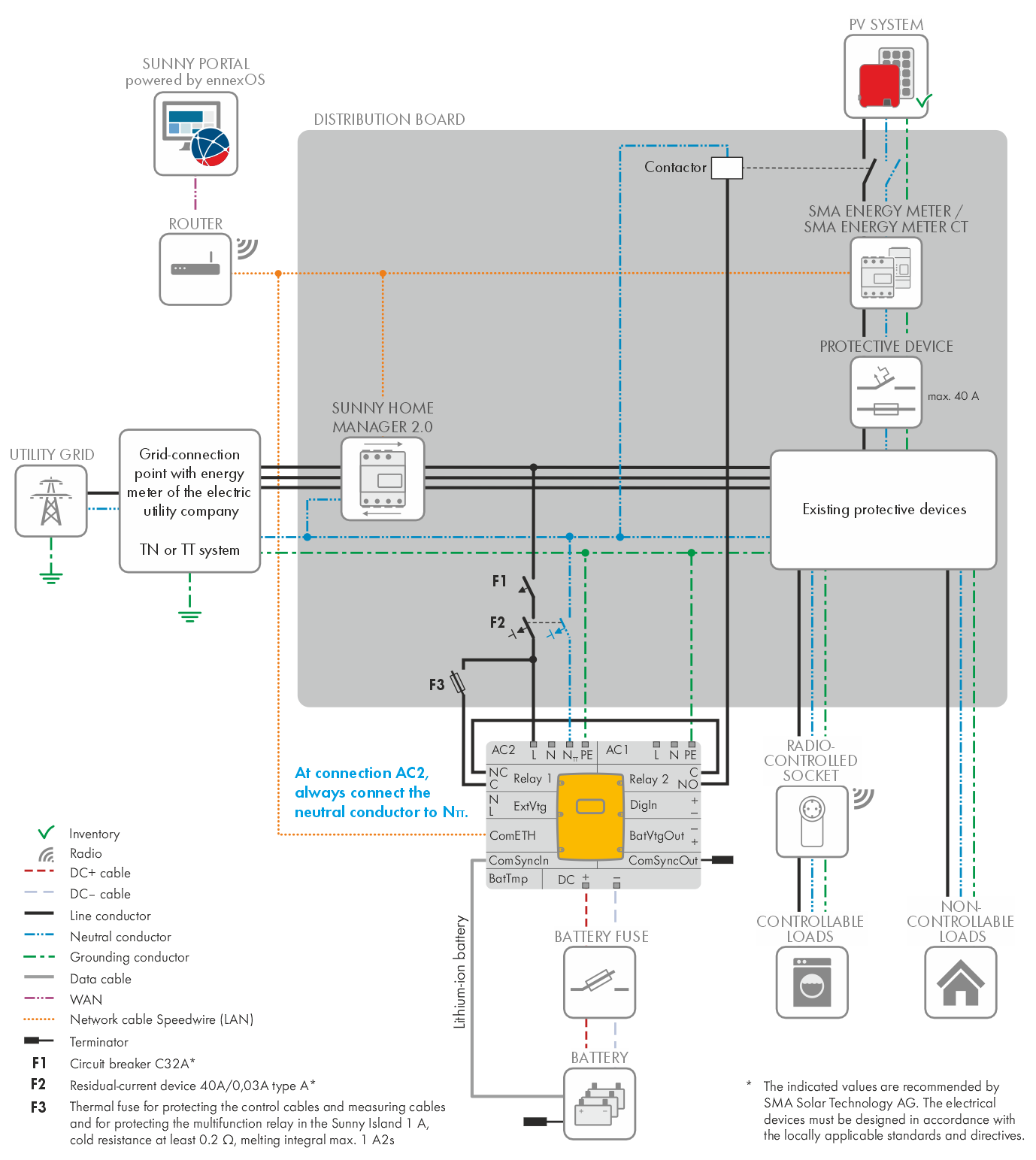
Circuitry overview for a system with Solution 3
Requirements for the Additional Installations:
Contactor with 2 make contacts: 230 VAC, 32 A, 2 x S
The contactor must be connected to the relay 1 and relay 2 connections in Sunny Island. The contacts C and NC as well as C and NO are used in series connection. For information on cable requirements and the installation procedure, refer to the product manual.
Requirements for a single-phase system with Sunny Island:
A single-phase system with a Sunny Island is only used for increased self-consumption, not as a battery-backup system.
Adjusting the Parameters via the User Interface of the Battery Inverter
Adjusting the Parameters of the Switching Limits
The following parameters in the parameter group Device > Load shedding 1 in the Sunny Island must be adjusted via the user interface so that the Sunny Island can control the PV inverter reliably.
Disconnection of the PV inverter: For relay 1 Battery state of charge threshold for stop load shedding 1: 85% of the SOC
Connection of the PV inverter: For relay 1 Battery state of charge threshold for start load shedding 1: 75% of the SOC
Relay 2 is closed when Sunny Island is in operation.
Relay 2 is opened when the Sunny Island is switched off, set to stop, or displays a fault.
Adjusting the Country Data Set
The current country data set must be selected for the system. To do this, the system must be configured as an on-grid system with self-consumption.
For information on the procedure for changing the settings on the Sunny Island user interface, refer to the product manual.
Communication failure between Sunny Island and energy meter or Sunny Home Manager 2.0
If communication between the Sunny Island and the SMA Energy Meter or the Sunny Home Manager 2.0 is interrupted, the Sunny Island stops after a certain time and both multifunction relays switch to the idle state. As a consequence, the PV inverter operation is also stopped.
The time to detect an interruption in the communication can be set in the parameter group System and device control via the device parameter Communication timeout data logging energy meter at the point of interconnection (1 to 30 seconds; default setting: 2 seconds).
Also see: