Connecting the Network Cables
 DANGER
Danger to life due to electric shock in case of overvoltages and if surge protection is missing
Overvoltages (e.g., in the event of a flash of lightning) can be further conducted into the building and to other connected devices in the same network via the network cables or other data cables if there is no surge protection. Touching live parts and cables results in death or lethal injuries due to electric shock.
- Ensure that all devices in the same network and the battery are integrated into the existing surge protection.
- When laying the network cables or other data cables outdoors, it must be ensured that a suitable surge protection device is provided at the transition point of the cable from the product or the battery outdoors to the inside of a building.
Additionally required material (not included in the scope of delivery):
Network cables
Where required: Field-assembly RJ45 connector.
Procedure:
- When using self-assembly cables, assemble the RJ45 connectors and connect them to the cable (refer to the documentation of the connector).
- For each cable attach a conduit fitting for attachment of the conduits to the connecting plate.
- Lead each cable through a conduit fitting in the connection plate up to the network jacks. Lay each cable according to the installation plan and attach to the brackets.
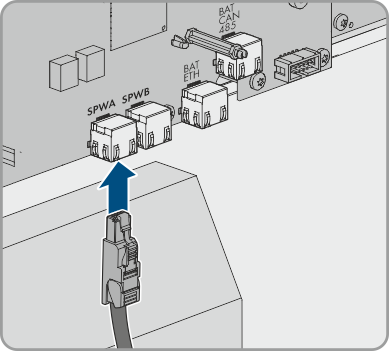
- Plug the RJ45 connector of the network cable into the socket SPWA or SPWB of the communication assembly.
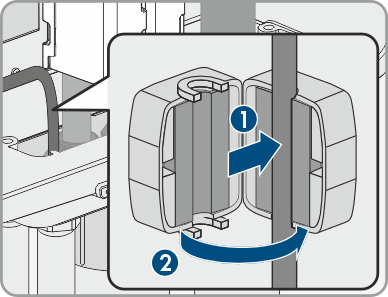
- Attach one ferrite included in the scope of delivery to each network cable.
- Ensure that the RJ45 plug is securely in place by pulling slightly on the cable.
- If the product is installed outdoors, install overvoltage protection for all components in the network.
- Either connect the other end of the network cable directly to the local network (e.g., via a router) or connect all present converters in the system to each other in line topology and connect the first or last converter in the line to the local network.